So many companies, retail stores, nonprofits, restaurants and small businesses are making a colossal mistake. They’re creating Facebook profiles for their businesses — not pages.
Here’s the difference: I am a person, so I have a Facebook profile. It looks like this:
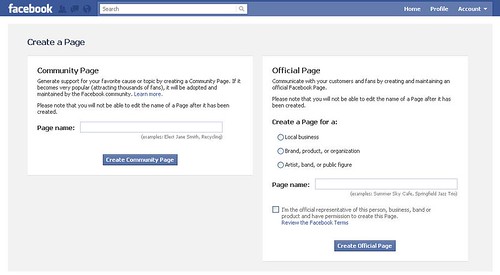
It’s not easy to figure this out, since Facebook changes almost daily but what you want for your business or organization is an Official Page, as seen below on the right. NOT a Community Page, which is the choice on the left.
Once you’ve set up your official Facebook Page, here are 10 things you can do with it, to generate “likes” or fans and build your community.
1. Add all events and post them
2. Post photos from events
3. Ask the community questions
4. Introduce topics for discussion
5. Feature key volunteers/members
6. Provide educational material
7. Link to external articles and other content of interest to the organization
8. Pass along special offers to the community when available
9. Celebrate organization “wins”
10. Inform the community about legislation and advocacy action they can take when appropriate.
As part of the social media presentation I gave to a nonprofit organization recently, I said: “prepare for the negative.”
It’s a good line; it gets attention and more importantly it encourages thought and preparation before engaging in social media. Whether you’re a small company, a large for-profit entity, a nonprofit or an individual practitioner you need to prepare for the negative and decide what you’re going to do about it when it happens.
“You can either use negative comments to get you down or you can use them to excite you and energize your process.” — Patrick Doyle, President, Domino’s Pizza.
Here are six ways you can take back lost business by changing the conversation:
1. Listen and respond. Learn what’s being said about your business by using social media monitoring tools, customer surveys, secret shops and focus groups. Find out what the negative is so you can develop a plan to address it.
2. Allow visibility. It’s a huge leap from where we were as a culture in using public relations and the dreaded “spin” to allowing the public to see your downfalls, your weaknesses and mistakes. It is critical to the current culture of customer service that you allow comments on your blog, that you allow customers to interact with you in the places they are online (Facebook, Twitter, etc.)
3. Reward feedback by thanking those who provide it and include them in the conversation of how you can make your service or your products better.
4. Respond to everything – let the public know you’re listening — we often find that people are more polite when they know you’re in the room.
5. Be accessible. Make sure you’re actually available on the social networks you’ve set up — if you have a Twitter account, you must be managing it. Provide your phone number and answer the phone! Provide an e-mail address or a contact form and make sure you’re following up.
6. Share the story of how you took a negative conversation and turned it around. Did you get a bad score on a customer service survey? What did you do to improve? Share the differences with your audiences and they will respect you for making the honest effort.
Oddly enough, I’m only posting this to drive you to another blog post on another site. I really want you to read this post: Moderating Blog Comments on Spin Sucks, the fight against destructive spin. Pay attention to the conversation unfolding in the comments themselves. It is a discussion worth your time and consideration.
The handling of blog comments – to moderate, to not moderate and all that resides between the two – has long been discussed. Many of us have different opinions on the topic. Personally, I don’t moderate, meaning, I don’t approve or delete comments before they appear — they are automatically published and if the comment is in violation of my comment policy, then I will remove it later. I’ve only had to do this once in about seven years of blogging so for me, it works.
I’m interested in this conversation though, and how Livefyre, the tool helping the conversation happen, will change the way we interact using comments on blogs.
Join the conversation — what do you think about moderating blog comments?
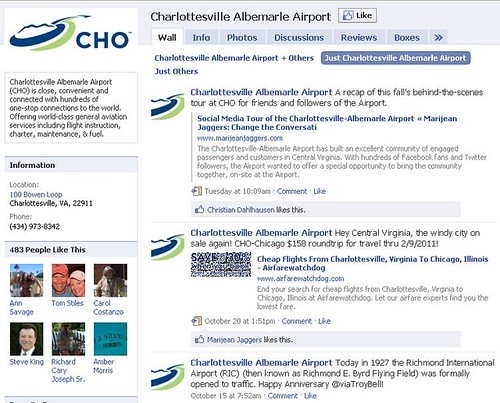
The Charlottesville-Albemarle Airport has built an excellent community of engaged passengers and customers in Central Virginia. With hundreds of Facebook fans and Twitter followers, the Airport wanted to offer a special opportunity to bring the community together, on-site at the Airport.
Using Twitter and Facebook to reach out to people in the community who are already interested members of the Airport’s audience, the Airport offered a special, behind-the-scenes runway tour of the Airport on a beautiful fall day.
The event was an opportunity for an online community to come together in real life (as they say) and participate in a shared experience. The Airport’s executive director Barbara Hutchinson was able to connect with customers and future customers of the Airport on a personal level, continuing to develop relationships on behalf of the Airport and making herself available to answer any questions the community had about the runway extension project or Airport operations.
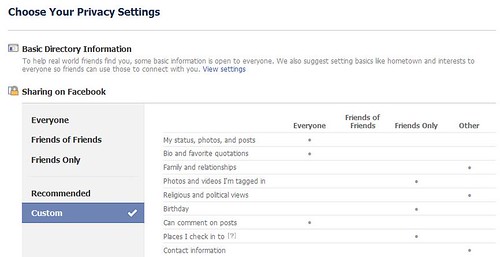
I just finished speaking to a group of nonprofit leaders at a workshop. There was a point in the discussion when one of the participants became very hung up in how one makes lists and decides who sees what in your Facebook profile. I’m endeavoring to address that here, in five easy steps.
1. Log on to Facebook and look for the word “Account” in the upper lefthand corner.
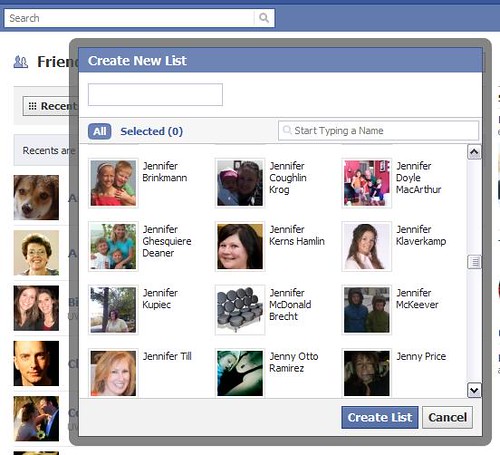
2. Click on Account and choose Edit Friends from the drop down menu to get to the following screen:
Just LOOK at all those lovely Jennifers!
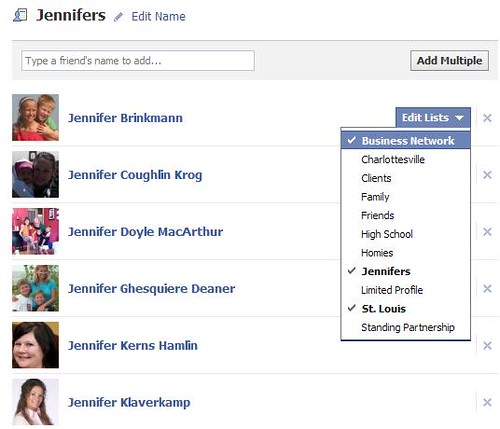
4. Now that I’ve created my list of Jennifers, I can decide if each Jennifer should belong to other lists as well, for example, this Jennifer is also a friend and someone who is part of my network in St. Louis, so she should belong to both of these lists as well.